
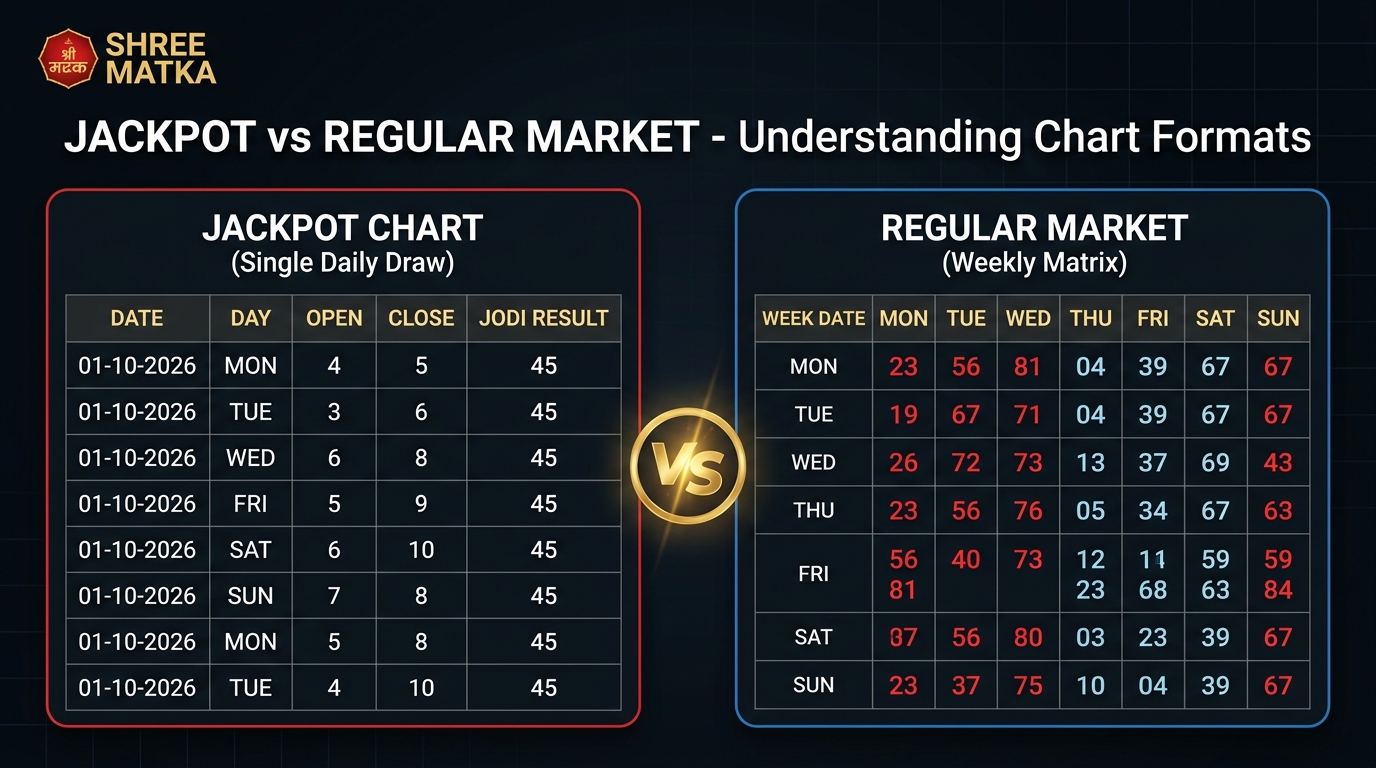
When you explore the MatkaFun homepage or the central charts directory, you encounter multiple game categories. While mainstream markets like Kalyan and Main Bazar dominate general discussions, the platform also provides a dedicated section labeled Jackpot Games.
First-time visitors often wonder why the Jackpot section looks different from standard market boards, what information its result boxes convey, and why its historical charts do not follow the usual Monday-to-Sunday calendar grid. This guide explains how the Jackpot section is structured on MatkaFun, how to read each column of a Jackpot chart, and how to tell its listings apart from regular market records.
Where to Find the Jackpot Section on MatkaFun
The Jackpot feature is integrated across three primary areas of the MatkaFun website:
- The Homepage Market Tabs: Directly below the live announcement ticker on the homepage, a tabbed interface lets you switch between Regular Markets, Starline, and Jackpot Games. Selecting the Jackpot tab filters the visible game cards to show regional Jackpot listings such as Mohali, Desawar, Gali, Faridabad, Delhi Bazar, and Shri Ganesh. Each card shows the market's current result status, a button linking to its chart, and quick play options.
- The Central Charts Index: Visiting the charts directory reveals a distinct section specifically grouped for Jackpot markets. Rather than mixing these listings into the regular Jodi or Panel tables, the system groups them separately so visitors can jump straight to the relevant archive.
-
Individual Jackpot Chart Pages: Direct chart URLs follow the path
/chart/jackpot/{market-slug}(for example, the Mohali Jackpot Chart). Every chart page includes a horizontal button switcher labeled "SELECT JACKPOT MARKET:", allowing you to switch between different markets with a single tap.
What a Jackpot Listing Displays
The fundamental difference between a Jackpot market and a regular market lies in the numerical components generated during each draw.
In regular markets, each draw session produces a three-digit Panel (or Panna), from which a single root digit is calculated by summing the digits modulo 10. A completed regular market outcome combines an Open Panna, an Open digit, a Close digit, and a Close Panna to produce an eight-digit composite string (such as 128-14-400).
Jackpot markets operate on a simpler, single-digit framework:
- Open Digit: A single numerical value from 0 through 9 declared during the market's opening window.
- Close Digit: A single numerical value from 0 through 9 declared during the market's closing window.
- Jodi Result: The two-digit combination formed by placing the Open digit first and the Close digit second (ranging from 00 to 99).
Because Jackpot games do not use three-digit panels, you will never see three-digit numbers such as 128 or 400 on a Jackpot card or chart. If an entry is still waiting for its scheduled draw, the platform displays an asterisk placeholder (*) for pending digits and a double asterisk (**) for an unfinalized Jodi.
The 5 Columns of a Jackpot Chart Table
When you open any Jackpot chart—such as the Mohali Jackpot chart—you are presented with a clean, five-column vertical table. Each row corresponds to a single calendar date.
The table layout contains the following exact columns:
-
Date: The calendar date on which the draw occurred, formatted as
DD-MM-YYYY(e.g., 01-10-2026). Records are arranged chronologically, allowing you to trace daily outcomes backwards in time. -
Day: The three-letter abbreviation for the day of the week (
MON,TUE,WED,THU,FRI,SAT, orSUN). - Open: The single digit declared during the open session, presented in a styled numerical badge.
- Close: The single digit declared during the close session, presented in a matching badge.
- Jodi Result: The combined two-digit result. Once both the Open and Close digits have been officially settled, this cell displays an active badge highlighting the finalized pair.
| Date | Day | Open | Close | Jodi Result |
|---|---|---|---|---|
| 01-10-2026 | MON | 4 | 5 | 45 |
| 02-10-2026 | TUE | 3 | 6 | 36 |
| 03-10-2026 | WED | 8 | 1 | 81 |
| 07-10-2026 | SUN | 7 | 2 | 72 |
Notice the Sunday record highlighted above. On the MatkaFun website, Sunday rows in Jackpot tables receive dedicated styling (sunday-row) to help readers quickly spot weekly milestones without getting lost in a long vertical list.
How Jackpot Charts Differ From Regular Market Charts
Understanding how the Jackpot section differs from regular market charts saves readers from confusing two completely different chart models. Regular market pages—such as the Main Bazar Jodi Chart—use a weekly calendar matrix, whereas Jackpot pages use a daily vertical timeline.
Here is a direct side-by-side comparison of the two presentations on MatkaFun:
| Feature | Jackpot Chart Format | Regular Market Jodi Chart | Regular Market Panel Chart |
|---|---|---|---|
| Table Organization | Vertical chronological list (1 row = 1 day) | 7-day calendar matrix (1 row = 1 full week) | 7-day calendar matrix (1 row = 1 full week) |
| Columns Shown | Date, Day, Open, Close, Jodi Result (5 columns) | Date Range + Mon to Sun (8 columns) | Date Range + Mon to Sun (8 columns) |
| Digits Recorded per Entry | 2 digits (Open Digit + Close Digit) | 2 digits (Composite Jodi only) | 8 digits (3-digit Open Pana + Jodi + 3-digit Close Pana) |
| Panel (Panna) Values | None (panels do not exist for Jackpot) | Omitted from view to keep the grid compact | Fully displayed (e.g., 128-14-400) |
| Row Grouping | Individual daily rows with Sunday accents | Weekly ranges (e.g., Jan 01 to Jan 07) | Weekly ranges (e.g., Jan 01 to Jan 07) |
| Market Switching | Direct horizontal button row on the page header | Via the main charts index or navigation links | Via the main charts index or navigation links |
If you are accustomed to scanning a weekly grid across columns from Monday to Sunday, reading a Jackpot chart requires a different approach. Instead of moving your eyes left to right across the week, you read straight down the table to follow outcomes from one day to the next.
Verify Results on the Official MatkaFun App
Access real-time draw declarations, verified market schedules, and historic archives directly from your Android phone.
Navigating and Verifying Records Accurately
When reviewing numbers in the Jackpot section, keeping a few practical navigation habits in mind ensures you are analyzing the right records:
- Confirm the Market Selector Before Reading: Because all Jackpot charts share the same five-column structure, it is easy to mistake one market's table for another if you arrive via an external link. Always glance at the title header and the active button in the "SELECT JACKPOT MARKET:" bar to confirm whether you are viewing Mohali, Desawar, Gali, or another regional listing.
-
Cross-Reference Both the Date and Day Columns: When checking historical draws, verify both the numerical date (
DD-MM-YYYY) and the weekday name. Looking for the highlighted Sunday row can help orient your position in the chronology. -
Distinguish Between Pending and Concluded Sessions: If a row displays an asterisk (
*) in the Close column and a double asterisk (**) in the Jodi column, the close session for that day has not concluded yet. The result updates automatically once the draw is verified. - Treat Historical Records as Archives: Chart archives on MatkaFun are factual historical records of completed events. Each draw is an independent event, and historical tables are provided for informational verification rather than as a guarantee of future outcomes.
Frequently Asked Questions
How does a Jackpot result differ from a regular market result?
What does an asterisk (*) indicate in a Jackpot record?
How can visitors switch between different Jackpot markets on the chart page?
Does the Jackpot section maintain Panel (Panna) charts?
Download the Official MatkaFun App
Track real-time draw results, browse verified market schedules, and explore complete historical chart archives on your Android smartphone.
Download App
Comments (0)
Loading comments...